
 I admit it I’m a BBQ-aholic and a sucker for good design. Recently, I have started to combine those two passions and have found they have a lot in common in their methods and approaches.
When getting ready to BBQ and design you need to follow a few steps:
1. Plan ahead
2. Prepare
3. Use the right tools
4. Expect surprises
5. Adapt
6. Present the final product
1. Plan ahead
Before you start to BBQ you need to plan ahead. You need to know what you’re cooking, who you’re cooking for and the amount of people you’re cooking for.
In design you need to do the same. You need to know what you’re creating, who your audience is and how big your target audience is.
2. Prepare
Once you know if you’re cooking brisket, pork, ribs or chicken you have to procure the items in the correct amount for the number of people you’re feeding and then prepare it, whether that is trimming the meat, marinating it, rubbing it or whatever.
When you design you have to create sketches, decide colors and prepare copy, along with other things. If you do plan and prepare it makes the whole job much easier.
3. Use the right tools
This one should not be a big surprise.
If I’m smoking 32 pork butts for an event I know I’m not going to use my little backyard smoker that can hold, maybe, six pork butts. Or if I’m cooking for family I’m not going to fire up the huge smoker that can do 32 butts.
If I’m creating a presentation I’m not going to use Indesign or Illustrator, I’ll use Keynote or PowerPoint. If I need to create a brochure I’m not going to use Word, I’ll use Indesign.
Using the right tools will save you time and energy as you don’t have to work as hard when you do.
4. Expect surprises
When I BBQ I always expect something will happen that I didn’t think of. I might not have enough wood, the cooker isn't heating up as fast as I would like, it's raining, or a myriad of other things. Each surprise that happens can effect the time of the cook and the outcome. Planning ahead helps to minimize this but some things are just out of our control and you have to adapt.
In design the client might change their mind, give you the wrong copy or specs, the wrong logo or the wrong images. Again planning ahead can help mitigate these problems but if they do arise you need to be able to be flexible enough to change things and adapt.
5. Adapt
When surprises happen you have to adapt your plan. You may even need to call in help. If your cookers temp is too low due to weather you can add more fuel to stoke the fire. If you find your temperature is too high you know your cooking time will be shorter so you need to plan what to do with the meat if it's done early.
Over the course of a project ideas and needs can change and as a designer you need to be ready to adapt your design to those changes. To correct things the client wants. Design is not about you and your body of work but about what the client needs and wants.
If you receive the wrong specs you can rescale everything to a larger or smaller size. If you have the wrong colors you can change them out.
Communicating with the client will help to ensure you have what you need and also help to make sure the project is exactly what they need.
6. Present the final product
Once the BBQ is made you have to serve it up. When cooking for family it is a simple, put it on a plater or in a bowl and let them at it. If you are doing competition you have have to present it and depending on what type of competition will determine your presentation. In one type you have to serve the judges at your cook site, show them your cooking process and give them a dinning experience. In another, you have to send the meat into a panel of judges placed in a standard box so it looks nice.
Once you have your final design you need to present it to the client. Depending on how you and the client decide it should be presented you may need to mount it on matt board, send them a PDF or give them a color digital proof. But whatever way you do it, it needs to be professional and ready for their sign-off.
As you can see both BBQ and design processes share much in common. Part of the pleasure I find in design and BBQ is the process you have to go through to get to the final product. Each part gets you a step closer to the final and once you get there you can enjoy it and know that you have a job well done.
Thursday, October 14, 2010
Design with a side of Slaw


Monday, April 12, 2010
To iPad or not to iPad?

I have been dreaming about having a tablet type device that I could draw on digitally, keep track of my calendar, watch and listen to media and a myriad of other things. My idea for a device was about the size of a clipboard that could be used to showcase ideas, create on the fly and even play games.
Well, in January, Apple announced my dream machine, the iPad. When the iPhone and iPod Touch came out I told a friend, “This is a test product for a tablet device.” Was it a test? probably not but it opened up the possibilities to one.

I have heard and read much of what the iPad can’t do, but as an eternal optimist I am looking forward to what it can and will be able to-do. When I got my iPod Touch the app store was only a rumor but I knew when it came out it would change the way these devices worked. I have the same feeling with the iPad. When OS 4 arrives for it in the fall it will make it that much better.
Will it replace my laptop or iPod Touch? No. It will supplement them. There are things I would love to do on a device between t
he two. But the iPod Touch will remain my pocket portable device, My laptop will be my work device and the iPad it will be my everything else device.
I don’t yet have the iPad but plan to get a 3g one. I am looking forward to seeing what it can really do. Using it as a sketch pad, PDF reader, book reader, movie watcher, music player and so much more.
Once I get my iPad I will let you all know if it meets my expectations or not. So yes I will iPad.
Here are a couple great places to get more info on the iPad:
and of course Apple's site
Thursday, October 15, 2009
Red Devil
I used a similar process to the one I used for the shrunken head. Started with a sketch but this time only drew half the face. I drew a fairly detailed sketch so I knew were to put the lines and had an idea of the shading.
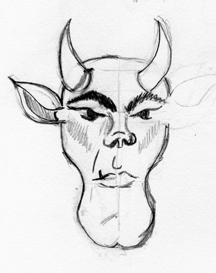
Once I had the sketch where I liked it I scanned it in and imported it to Adobe Illustrator. I scaled it to the size I wanted to work with, reduced the transparency to 50% and locked the layer.
I then created a new layer and started to create my vector outlines. I start by roughing them in and then going back and refining them to follow the sketch. In some places I didn't like the way the lines look once added so I alter them to be more visually appealing. Once I had half the outline done I filled it in with a nice red to get an idea of how the shape looked.

I created another new layer that I added the facial features to. I refined them also to make sure they looked like I wanted them to.
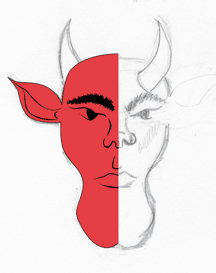

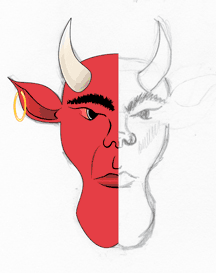
Combining the two halves gave me the whole face. I went in and tweaked it some more. Adding extra shading and details to make it look better. One thing I had noticed when I first combined the halves was he looked cross-eyed. I redid the eyes and liked the way he looked finally.

I added some colors and shading to the background and used one of the textures from Crumble. Crackle. Burn. to create the final look. I also used the image as one of my bottle labels for Monster Brew.

Monday, October 12, 2009
Visual Journaling


Monday, September 14, 2009
Q
I helped a friend at a couple different BBQ competitions and got to thinking, “With all these people walking around, not many are wearing cool BBQ shirts. Someone needs to make some.” So I created some.
My original idea was a line called “Q-wear.” I shared my idea with a couple friends who are designers (I have found as an independent designer it is important to have a network you can share ideas with). I used their feedback to refine my image and ideas. After going back and forth I settled on just Q. It can use it in multiple ways - from shirts, to sauces, to rubs. It was also pointed out to me “Q-wear” could be misread so just “Q,” short for BBQ, was the way to go.
I had done some sketches and played with some fonts and flames with various results.

After some revisions and redoes I created this.

I can use it in a variety of ways, like these:

It also looks good on t-shirts.


If you would like to purchase a t-shirt you can do so at www.zazzle.com/grafixgibbs
Friday, September 4, 2009
Design Thinking

The other day I was listening to the Reflex Blue Show from 36 Point. They were interviewing Bill Grant and he used the term “Design Thinking.” I had never heard of it before. Being a designer, it piqued my curiosity so I did what anyone else would do. I Googled it. I came across the Wikipedia entry and they defined design thinking as -
“Design thinking is a process for practical, creative resolution of problems or issues that looks for an improved future result.[1] It is the essential ability to combine empathy, creativity and rationality to meet user needs and drive business success”
After doing some more research, I found there were various number of steps for the process ranging from four to eight. Also the process when applied is not a start and stop process but a continual one. The final step leads back to the first step so there is constant improvement and refinement.
I laughed to myself as I thought, “Hey that’s what I’ve been doing for a while now and never even realized it.” In fact it is part of my design process. When I started my design business I knew I needed a process or a way to explain how I work. After much thought I boiled it down to four words, each encapsulating a different part of the process - Imagine. Explore. Design. Create.
Imagine. Defining the problem. Identifying the audience. Determining the goal.
Explore. Examining solutions. Creating options. Considering and researching possibilities.
Design. Brainstorming options. Refining and selecting the direction. Putting ideas on paper.
Create. Reviewing the goal. Choosing the best design. Executing the final product.
Saturday, January 24, 2009
Monster Brew
After creating Frankenstein, the shrunken head and the devil image for MonsterMonday, I was wondering what they could be used for. I showed the shrunken head image to a friend and the made a comment about “creative juices.” That got me thinking about different names for it and I came up with Voodoo Juice. “Hmm ,” I thought, “that would make a cool beverage label sitting on a shelf in a store.” I played around with it and came up with the Voodoo Juice label and then the light went on. Why not do Monster Brew’s labels and see what they look like? So I took the three I had done and added a pirate themed one and “BAM!”
After creating the labels I wanted to see what they would look like on bottles. I found an image of a suitable bottle and went into Photoshop and placed the labels on the bottles. I then clipped the bottles out and placed them all together. I had the beverage bottles but they needed a neck label to show the company. After tossing around some ideas I came up with Monster Brew. Each of the labels had the silhouette of a skull and cross bones behind it so I had to use that as the logo. I played around in Illustrator and created the logo.
I turned again to Photoshop and added the labels to the necks to produce the finished look.
I love it when one idea feeds another. As you can see the creative process is sometimes WHAM! and you have it other times it is slow and takes time. In this case each idea created the next and I have a final creation that I like. There are two more brews I want to add to finalize the six pack, so watch for them.


